Issaquah Robotics Society - Fauxbot
Programming resources for Fauxbot exercises
GarageDoor Exercise
Introduction
The goal of the GarageDoor exercise is to introduce students to writing code for a non-trivial mechanism that controls a motor based on both driver inputs as well as sensors. It is expected that students will have seen and operated a Garage Door in the past, and thus be familiar with the concept of a through-beam sensor and the way that the button works.
Difficulty
Programming: 3 (managing state and state transitions) Robotics: 2 (input from sensors)
Implementing GarageDoorMechanism
We’ll now cover the basics that will need to be understood for implementing the GarageDoorMechanism. More specific instructions exist in the Robot Code Instructions
Actuators
Motor (Talon)
The Garage Door has just one single actuator, a Motor. This motor can either open or close the Garage Door by spinning either in one direction or the other. You can assume that the positive direction opens the Garage Door and negative closes the Garage Door. The motor is connected to the RoboRIO’s PWM channel 0.
Sensors
Open Sensor (DigitalInput)
The Garage Door has a limit switch that helps to inform when the Garage Door has fully opened. When this limit switch detects that the Garage Door has fully opened, the switch will return a value of true. Otherwise, the switch will return a value of false. The open sensor is connected to the RoboRIO’s Digital I/O channel 1.
Closed Sensor (DigitalInput)
The Garage Door has a limit switch that helps to inform when the Garage Door has fully closed. When this limit switch detects that the Garage Door has fully closed, the switch will return a value of true. Otherwise, the switch will return a value of false. The closed sensor is connected to the RoboRIO’s Digital I/O channel 2.
Through-Beam Sensor (DigitalInput)
The Garage Door has a through-beam sensor that helps to inform when something is blocking the Garage Door from opening safely. When this through-beam sensor detects that there is something blocking the Garage Door, the sensor will return a value of true. Otherwise, the sensor will return a value of false. The through-beam sensor is connected to the RoboRIO’s Digital I/O channel 0.
Operations
Button (Digital)
Garage Doors traditionally only have one button. The action that results from pressing this button depends on the current state of the Garage Door, either telling the Garage Door to open or close.
Updating State
The below state diagram shows how the Garage Door can move between different states based on the button being pressed, the through-beam sensor being broken, and the sensors detecting the that Garage Door is fully opened or fully closed.
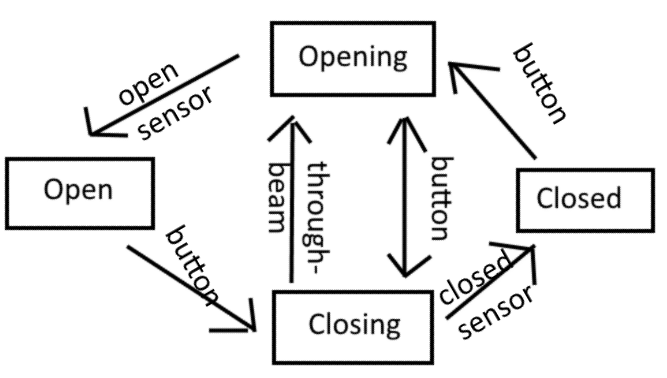
Whenever the Garage Door is opening or closing, it should provide positive or negative power to the motor, respectively. Whenever the Garage Door is open/closed, it should not provide power to the motor.